
PyNVMe3 IO Models
Last Modified: August 10, 2026
Copyright © 2020-2026 GENG YUN Technology Pte. Ltd.
All Rights Reserved.
1. IOWorker
With ioworker, we can hit greater IO pressure than fio, and meanwhile achieve a variety of test targets and features, such as SGL, ZNS, etc. PyNVMe3 can also define other actions in scripts while ioworker is running, such as power cycle, reset, and commands. For example, after starting several ioworkers, the main thread can still poll SMART temperature once per second with nvme0.getlogpage(0x02, ...) while the background workloads continue. This allows the script to enable more complex test scenarios. Each ioworker will create a separate child process to send and receive IO, and will create its own qpair, which will be deleted after the ioworker is completed.
In order to make better use of IOWorker, we will introduce the parameters of IOWorker one by one with pieces of demonstrated examples. But the test script does not need to define every parameter one by one, because the default values are reasonable for most of the time. IOWorker has many parameters, so scripts have to use keyword to define each parameter.
1.1 Parameters
io_size
io_size defines the size of each IO, which is in LBA units, and the default is 8 LBA. It can be a fixed size, or a list of multiple sizes. If the proportion of the sizes is not evenly distributed, we can set the percentage in the dictionary form.
The script below demonstrates 3 cases: 4k random read; 4K/8k/128k uniform mixed random read; 50% 4K random read, 25% 8K random read, and 25% 128K random read.
def test_ioworker_io_size(nvme0n1):
    nvme0n1.ioworker(io_size=8,
                     time=5).start().close()
    nvme0n1.ioworker(io_size=[8, 16, 256],
                     time=5).start().close()
    nvme0n1.ioworker(io_size={8:50, 16:25, 256:25},
                     time=5).start().close()
lba_align
lba_align sets the alignment (in LBA units) of the starting LBA for every I/O that ioworker issues. The starting LBA (slba) of each command will be a multiple of lba_align. Default: 1 (no additional alignment constraint).
Keep this default in mind when the testcase cares about physical alignment. For example, 4KiB random workloads on 512-byte namespaces usually need lba_align=8, and larger transfers such as 128KiB often use lba_align=256 so every command starts on the intended boundary instead of only being aligned to one LBA.
def test_ioworker_lba_align(nvme0n1):
    # Issue 4KiB random reads; each IO starts on a 4KiB boundary.
    nvme0n1.ioworker(io_size=8,        # 8 LBAs = 4KiB
                     lba_align=8,      # align starts to 4KiB boundaries
                     lba_random=True,
                     time=5).start().close()
time
time controls the running time of the ioworker in seconds. Below is an example of an ioworker running for 5 seconds.
def test_ioworker_time(nvme0n1):
    nvme0n1.ioworker(io_size=8,
                     time=5).start().close()
io_count
io_count specify the number of IOs to send in the ioworker. The default value is 0, which means unlimited. Either io_count or time has to be specified. When both are specified, the ioworker ends when either limit is met. The following example demonstrates sending 10,000 IO.
def test_ioworker_io_count(nvme0n1):
    nvme0n1.ioworker(io_size=8,
                     io_count=10000).start().close()
lba_count
lba_count caps the total number of LBAs the ioworker processes before it stops. It’s more precise than io_count (which counts commands) and is especially handy when io_size mixes multiple sizes.
def test_ioworker_lba_count_mixed(nvme0n1):
    gib = 1024 * 1024 * 1024
    lbas_1gib = gib // nvme0n1.sector_size  # convert 1 GiB to LBAs

    nvme0n1.ioworker(
        io_size={8: 60, 128: 40},            # 4 KiB & 64 KiB mix (if 1 LBA = 512 B)
        lba_align=8,                          # align to 4 KiB boundaries
        lba_random=True,
        read_percentage=70,                   # 70% reads, 30% writes
        lba_count=lbas_1gib,                  # stop after totaling 1 GiB of LBAs
        time=600                              # safety timeout; first condition wins
    ).start().close()
lba_random
lba_random specifies the percentage of random IO, the default is True, which means 100% random LBA. The following example demonstrates a sequential IO and a 50%-random IO.
def test_ioworker_lba_random(nvme0n1):
    nvme0n1.ioworker(lba_random=False,
                     time=5).start().close()
    nvme0n1.ioworker(lba_random=50,
                     time=5).start().close()
lba_start
lba_start sets the starting LBA for the first command. Default: if region_start is provided, the first command starts at region_start; otherwise it starts at 0.
lba_step
lba_step can only be used in sequential IO, where the starting LBA of IO will be controlled by lba_step. The size of the lba_step, like the io_size, is in LBA unit. The following example demonstrates an IO size of 4k sequential read, with a 4K-gap between each IO.
def test_ioworker_lba_step(nvme0n1):
    nvme0n1.ioworker(io_size=8,
                     lba_random=False,
                     lba_step=16,
                     time=5).start().close()
With lba_step, ioworker can also decrease the LBA address of the IO. Script can set it to a negative number. The following example demonstrates reading in reverse order, where ioworker sends read commands on LBA 10, 9, 8, 7, 6, 5, 4, 3, 2, 1.
def test_ioworker_lba_step(nvme0n1):
    nvme0n1.ioworker(lba_random=False,
                     io_size=1,
                     lba_start=10,
                     lba_step=-1,
                     io_count=10).start().close()
When the lba_step is set to 0, ioworker can repeatedly read and write to the specified LBA.
def test_ioworker_lba_step(nvme0n1):
    nvme0n1.ioworker(lba_random=False,
                     lba_start=100,
                     lba_step=0,
                     time=5).start().close()
start_time
start_time specifies the earliest epoch timestamp at which the ioworker can begin issuing and completing I/O operations. Use a value generated by time.time() (optionally with an added offset) to introduce a pre-run idle period or synchronize the start of multiple ioworkers. By default, the ioworker starts sending I/O immediately.
For synchronized multi-worker workloads, it is common to give every ioworker the same start_time while also assigning different cpu_id values so they begin at the same time without competing for the same host core.
def test_ioworker_start_time(nvme0n1):
    import time
    target = time.time() + 10

    start_time = time.time()
    wlist = []
    for i in range(5):
        w = nvme0n1.ioworker(io_size=8,
                             read_percentage=100,
                             time=10,
                             cpu_id=i+1,
                             start_time=target).start()
        wlist.append(w)
        time.sleep(1)

    for w in wlist:
        r = w.close()
read_percentage
read_percentage Specify the ratio of reads and writes, 0 means all write, 100 means all read. The default is 100. The following is an example of 50% each.
def test_ioworker_read_percentage(nvme0n1):
    nvme0n1.ioworker(read_percentage=50,
                     time=5).start().close()
op_percentage
op_percentage lets you specify an explicit mix of NVMe opcodes (not limited to read/write). Provide a dict of {opcode: percentage}. If both op_percentage and read_percentage are set, op_percentage takes precedence. Percentages may be decimals; the total must sum to exactly 100.00% (to two decimal places).
After ioworker.close(), this same dictionary is updated in place so each key holds the actual IO count issued for that opcode. If you need to preserve the original percentages for later comparison or logging, copy the dict before passing it into ioworker().
def test_ioworker_op_percentage_int(nvme0n1):
    nvme0n1.ioworker(
        op_percentage={2: 40, 1: 30, 9: 30},  # Read/Write/Deallocate
        time=5
    ).start().close()

def test_ioworker_op_percentage_decimal(nvme0n1):
    nvme0n1.ioworker(
        op_percentage={2: 33.34, 1: 33.33, 9: 33.33},  # must sum to 100.00
        lba_random=True,
        io_size=8,
        time=10
    ).start().close()
sgl_percentage
sgl_percentage specifies the percentage of IO using SGL. 0 means only PRP and 100 means only SGL. The default value is 0. The following example demonstrates setting the commands issued by ioworker to use 50% PRP and 50% SGL.
def test_ioworker_sgl_percentage(nvme0n1):
    nvme0n1.ioworker(sgl_percentage=50,
                     time=5).start().close()
qdepth
qdepth specifies the queue depth of the Qpair object created by the ioworker. The default value is 63. Below is an example of an IO queue depth of 127 (Q’s size is 128) used in ioworker.
def test_ioworker_qdepth(nvme0n1):
    nvme0n1.ioworker(qdepth=127,
                     time=5).start().close()
qprio
qprio specifies the priority of the SQ created by the ioworker. The default value is 0. This parameter is only valid when the arbitration mechanism is selected as weighted round robin with urgent priority (WRR).
def test_ioworker_qprio(nvme0n1):
    nvme0n1.ioworker(qprio=0,
                     time=5).start().close()
region_start
IOWorker sends IO in the specified LBA region, from region_start to region_end. Below is an example of sending IO starting from an LBA 0x10.
def test_ioworker_region_start(nvme0n1):
    nvme0n1.ioworker(region_start=0x10,
                     lba_random=True,
                     time=5).start().close()
region_end
IOWorker sends IO in the specified LBA region, from region_start to region_end. region_end is not included in the region. Its default value is the max_lba of the drive. When send IO with sequential LBA, and neither time nor io_count specified, ioworker send IO from region_start to region_end by one pass. Below is an example of sending IO from LBA 0x10 to 0xff.
def test_ioworker_region_end(nvme0n1):
    nvme0n1.ioworker(region_start=0x10,
                     region_end=0x100,
                     time=5).start().close()

    nvme0n1.ioworker(region_start=[0x10, 0x1010],
                     region_end=[0x100, 0x1100],  # two regions: 0x10-0x100, 0x1010-0x1100
                     time=5).start().close()
iops
In order to construct test scenarios under different pressures, the iops parameter in ioworker can specify the maximum IOPS. Then ioworker limits the speed at which IOs are sent. The default value is 0, which means unlimited. Below is an example that specifies an IOPS pressure of 12345 IO per second.
def test_ioworker_iops(nvme0n1):
    nvme0n1.ioworker(iops=12345,
                     time=5).start().close()
io_flags
io_flags specifies the 16 bits of dword12 of io commands issued in the ioworker. The default value is 0. The following is an example of sending write command with FUA bit enabled.
def test_ioworker_io_flags(nvme0n1):
    nvme0n1.ioworker(io_flags=0x4000,
                     read_percentage=0,
                     time=5).start().close()
distribution
distribution parameter divides the whole LBA space into 100 parts, and distribute all 10,000 parts of IO into 100 parts of LBA space. The list indicates how to allocate 10,000 IOs to these 100 different parts. This parameter can be used to implement the JEDEC endurance workload as below: 1000 IOs are allocated in each of the first 5 1% intervals, that is, the first 5% interval contains half of the IO; Each of the 15 1% intervals of 5%-20% allocates 200 IOs, that is, this 15% LBA space contains 30% of IO; The last 80% of the interval contains the remaining 20%.
def test_ioworker_jedec_workload(nvme0n1):
    distribution = [1000]*5 + [200]*15 + [25]*80
    iosz_distribution = {1: 4,
                         2: 1,
                         3: 1,
                         4: 1,
                         5: 1,
                         6: 1,
                         7: 1,
                         8: 67,
                         16: 10,
                         32: 7,
                         64: 3,
                         128: 3}
    nvme0n1.ioworker(io_size=iosz_distribution,
                     lba_random=True,
                     qdepth=128,
                     distribution=distribution,
                     read_percentage=0,
                     ptype=0xbeef, pvalue=100,
                     time=1).start().close()
ptype and pvalue
The same as ptype and pvalue of Buffer objects, ioworker also can specify data pattern with these two parameter. The default pattern in ioworker is a total random buffer that cannot be compressed.
def test_ioworker_pvalue(nvme0n1):
    nvme0n1.ioworker(ptype=32,
                     pvalue=0x5a5a5a5a,
                     read_percentage=0,
                     time=5).start().close()
io_sequence
io_sequence can specify the starting LBA, the number of LBAs, the opcode of the command, and the send timestamp (in us) for each IO sent by ioworker. io_sequence is a list containing commands information, and one command information is (slba, nlb, opcode, time_sent_us). The following is an example of sending read and write commands via ioworker. With parameters, the script can send the specified IO at the specified time through ioworker.
def test_ioworker_pvalue(nvme0n1):
    nvme0n1.ioworker(io_sequence=[(0, 1, 2, 0),
                                  (0, 1, 1, 1000000)],
                     ptype=0, pvalue=0).start().close()
slow_latency
slow_latency is in unit of microseconds (us). When the IO latency is greater than this parameter, ioworker prints a debug message and throws a warning. The default is 1 second.
def test_ioworker_slow_latency(nvme0n1):
    nvme0n1.ioworker(io_size=128,
                     slow_latency=2000_000,
                     time=5).start().close()
exit_on_error
When any IO command fails, the ioworker exits immediately. If you want to continue running ioworker when any IO command fails, you need to specify this parameter exit_on_error to False.
def test_ioworker_exit_on_error(nvme0n1):
    nvme0n1.ioworker(exit_on_error=True,
                     time=5).start().close()
verify_disable
verify_disable turns off data-integrity checking for the affected operation(s), bypassing CRC/pattern validation to remove host-side overhead during pure performance runs. Default: False (verification is enabled if globally turned on).
def test_perf_unverified_ioworker(nvme0n1):
    a = nvme0n1.ioworker(
        io_size=8,               # 4 KiB if 1 LBA = 512 B
        lba_align=8,
        lba_random=True,
        qdepth=127,
        verify_disable=True,     # <-- disable verify for this worker
        time=10
    ).start()
    r = a.close()
    logging.info(r)
cpu_id
The cpu_id parameter in ioworker is designed to distribute the workload across different CPU cores. To achieve optimal performance and latency, it is assumed that each ioworker utilizes 100% of a single CPU core’s resources. However, in practice, multiple ioworkers may sometimes be allocated to the same CPU core. When this happens, the combined performance of these ioworkers is nearly the same as that of a single ioworker. This outcome is not desirable when using multiple ioworkers, so the cpu_id parameter is used to enforce the allocation of different ioworkers to separate CPU cores.
For example, in a 4K random read performance test, one ioworker can achieve 1M IOPS, and two ioworkers can achieve 2M IOPS. However, if they are accidentally allocated to the same CPU core, the two ioworkers still only achieve 1M IOPS. By using the cpu_id parameter, we can avoid this situation and ensure that each ioworker is assigned to a different CPU core, thus achieving the expected performance increase.
def test_performance(nvme0, nvme0n1):
    qcount = 1
    iok = 4
    qdepth = 128
    random = True
    readp = 100
    iosize = iok*1024//nvme0n1.sector_size
    start_time = time.time() + 10

    l = []
    for i in range(qcount):
        a = nvme0n1.ioworker(io_size=iosize,
                             lba_align=iosize,
                             lba_random=random,
                             cpu_id=i+1,
                             qdepth=qdepth-1,
                             read_percentage=readp,
                             start_time=start_time,
                             time=10).start()
        l.append(a)

    io_total = 0
    for a in l:
        r = a.close()
        logging.debug(r)
        io_total += (r.io_count_read+r.io_count_nonread)

    logging.info("Q %d IOPS: %.3fK, %dMB/s" % (qcount, io_total/10000, io_total/10000*iok))
In this example, each worker uses a unique cpu_id and the same start_time, so all workers are created first and begin I/O at the same scheduled time.
1.2 Output Parameters
output_io_per_second
Save the number of IOs per second in the form of a list. Default value: None, no data is collected. Below is an example of collecting IOPS per second in a io_per_second list.
def test_ioworker_output_io_per_second(nvme0n1):
    io_per_second = []
    nvme0n1.ioworker(output_io_per_second=io_per_second,
                     time=5).start().close()
    logging.info(io_per_second)
output_percentile_latency
IO latency is important on both Client SSD and Enterprise SSD. IOWorker use parameter output_percentile_latency to collect latency information of all IO. ioworker can collect IO latency on different percentages in the form of a dictionary. The dictionary key is a percentage and the value is the delay in microseconds (us). Default value: None, no data is collected. The following example demonstrates the latency of 99%, 99.9%, 99.999% IO.
def test_ioworker_output_percentile_latency(nvme0n1):
    percentile_latency = dict.fromkeys([99, 99.9, 99.999])
    nvme0n1.ioworker(output_percentile_latency=percentile_latency,
                     time=5).start().close()
    logging.info(percentile_latency)
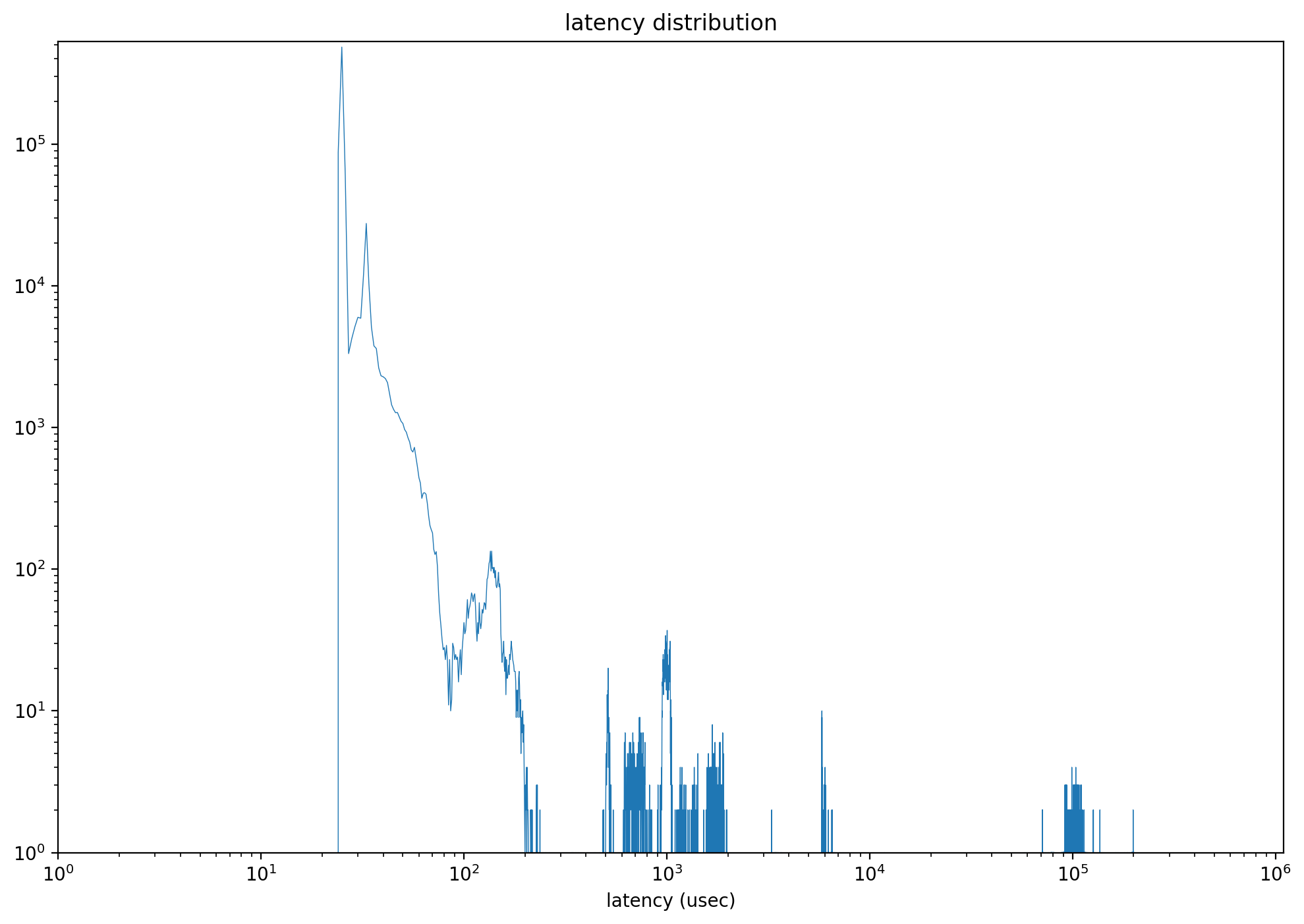
After specifying this parameter, the returned object also includes latency_distribution, which is a list of length 1,000,000. Each index represents a latency point in microseconds from 0 to 999,999, and the value at that index is the IO count observed at that latency. With these data, scripts can draw a distribution graph as shown below.
output_percentile_latency_opcode
IOWorker can track the latency of commands with a specific opcode. The default value is None, which tracks the latency of all opcodes. The following example demonstrates tracking only the latency of DSM commands in the returned output_percentile_latency.
def test_ioworker_output_percentile_latency_opcode(nvme0n1):
    percentile_latency = dict.fromkeys([99, 99.9, 99.999])
    nvme0n1.ioworker(op_percentage={2: 40, 9: 30, 1: 30},
                     output_percentile_latency=percentile_latency,
                     output_percentile_latency_opcode=9,
                     time=5).start().close()
    logging.info(percentile_latency)
output_cmdlog_list
This parameter collects information about the commands that ioworker most recently sent and reaped. The information for each command includes the starting LBA, the number of LBAs, the opcode, the send timestamp, the completion timestamp, and the return status. This information is recorded as tuples (slba, nlb, opcode, time_sent_us, time_cplt_us, status). The default value is None, which means no data is collected. The following script captures information about the latest 1000 commands before poweroff occurs.
def test_power_cycle_dirty(nvme0, nvme0n1, subsystem):
    cmdlog_list = [None]*1000
    # 128K random write
    with nvme0n1.ioworker(io_size=256,
                          lba_align=256,
                          lba_random=True,
                          read_percentage=30,
                          slow_latency=2_000_000,
                          time=15,
                          qdepth=63,
                          output_cmdlog_list=cmdlog_list):
        # sudden power loss before the ioworker end
        time.sleep(5)
        subsystem.poweroff()
    # power on and reset controller
    time.sleep(5)
    start = time.time()
    subsystem.poweron()
    nvme0.reset()
    logging.info(cmdlog_list)
cmdlog_error_only
When cmdlog_error_only is True, ioworker only collects the information of error commands into output_cmdlog_list.
1.3 Return Values
IOWorker.close() returns after all I/O has been sent and reaped by ioworker, and it provides a structure that includes these parameters:
io_count_read: Counts the read commands executed by the ioworker.io_count_nonread: Tally of non-read commands executed by the ioworker.mseconds: Duration of the ioworker operation in milliseconds.latency_max_us: Maximum command latency, measured in microseconds.error: Error code recorded in case of an IO error.error_cmd: Submission Queue Entry of the command causing an IO error.error_cpl: Completion Queue Entry of the command causing an IO error.cpu_usage: CPU usage during the test to assess host CPU load.latency_average_us: Average latency of all IO commands, in microseconds.latency_distribution: A 1,000,000-entry list of latency counts, where indexnrecords the IO count observed atnmicroseconds.io_count_write: Number of write commands executed by the ioworker.lba_count_read: Number of LBAs read during the operation.lba_count_nonread: Count of LBAs processed in non-read operations.lba_count_write: Total LBAs written by the ioworker.
Here’s a normal ioworker returned object:
'io_count_read': 10266880,
'io_count_nonread': 0,
'mseconds': 10001,
'latency_max_us': 296,
'error': 0,
'error_cmd': [0, 0, 0, 0, 0, 0, 0, 0, 0, 0, 0, 0, 0, 0, 0, 0],
'error_cpl': [0, 0, 0, 0],
'cpu_usage': 0.8465153484651535,
'latency_average_us': 60,
'test_start_sec': 1669363788,
'test_start_nsec': 314956299,
'latency_distribution': None,
'io_count_write': 0
And this is the return object with error:
'io_count_read': 163,
'io_count_nonread': 0,
'mseconds': 2,
'latency_max_us': 791,
'error': 641,
'error_cmd': [3735554, 1, 0, 0, 0, 0, 400643072, 4, 0, 0, 5, 0, 0, 0, 0, 0],
'error_cpl': [0, 0, 131121, 3305242681],
'cpu_usage': 0.0,
'latency_average_us': 304,
'test_start_sec': 1669364412,
'test_start_nsec': 822867651,
'latency_distribution': None,
'io_count_write': 0
IOWorker error codes and descriptions:
| Error Code | Error Name | Description |
|---|---|---|
| 0 | Success | Indicates that no error occurred during the operation. |
| -1 | Init Fail in Pyx | Initialization failed in the underlying Pyx library or hardware abstraction. |
| -2 | IO Size is Larger than MDTS | The I/O request size exceeds the Maximum Data Transfer Size (MDTS) limit. |
| -3 | IO Timeout | The I/O operation did not complete within the expected time limit. |
| -4 | IOWorker Timeout | The ioworker process or thread exceeded its execution time limit. |
| -5 | Buffer Pool Alloc Fail | Failed to allocate memory from the buffer pool for the I/O operation. |
| -6 | IO Cmd Error | An error occurred during the execution of an NVMe I/O command. |
| -7 | Sudden Terminated | The ioworker was unexpectedly terminated before completing its operation. |
| -8 | Slow IO | The I/O operation completed but took significantly longer than expected. |
| -9 | Create Qpair Fail | Failed to create a queue pair (Submission Queue or Completion Queue). |
| -10 | Illegal Sector Size | The sector size specified for the operation is invalid or unsupported. |
1.4 Examples
- 4K Full Disk Sequential Reading:
def test_ioworker_full_disk(nvme0n1): ns_size = nvme0n1.id_data(7, 0) nvme0n1.ioworker(lba_random=False, io_size=8, read_percentage=100, region_end=ns_size).start().close() - 4K full disk random write:
def test_ioworker_qpair(nvme0n1): nvme0n1.ioworker(lba_random=True, io_size=8, read_percentage=0, time=3600).start().close() - Inject reset event during the IO:
def test_reset_controller_reset_ioworker(nvme0, nvme0n1):
    # Deassert CC.EN and wait for CSTS.RDY to clear before resetting.
    with nvme0n1.ioworker(io_size=8, time=10):
        time.sleep(5)
        nvme0[0x14] = 0
        nvme0.wait_csts(rdy=False)
        nvme0.reset()
1.5 Compare with FIO
Both FIO and IOWorker provide many parameters. This table can help us to port FIO tests to PyNVMe3/IOWorker.
| fio parameter | ioworker parameter | Description |
|---|---|---|
bs |
io_size |
Sets the block size for I/O operations. ioworker can provide a single block size or specify multiple sizes through a list or dict. |
ba |
lba_align |
The LBA alignment for I/O. By default, fio aligns with the bs value, whereas ioworker defaults to 1. |
rwmixread |
read_percentage |
Specifies the percentage allocation of read-write mix. |
percentage_random |
lba_random |
Defines the percentage of random versus sequential operations. |
runtime |
time |
Defines the duration of the test run. |
size |
region_start, region_end |
Defines the size or range of the test area. PyNVMe3 can define the start and end LBA addresses of a single continuous region or specify multiple discrete areas through a list parameter. |
iodepth |
qdepth |
Sets the queue depth. |
buffer_pattern |
ptype, pvalue |
Sets the data pattern for the I/O buffer. ioworker fills the data buffer with the specified pattern upon initialization. |
rate_iops |
iops |
Limits the number of I/O operations per second. |
verify |
fio uses verify to check data integrity. PyNVMe3, by default, verifies the data consistency of each LBA with CRC after each read operation. |
|
ioengine |
fio typically selects libaio, while ioworker directly utilizes the higher performance SPDK driver. | |
norandommap |
fio uses norandommap for entirely random reads and writes. PyNVMe3 behaves completely randomly and uses LBA locks to ensure asynchronous I/O mutuality on LBAs, allowing data consistency checks to be performed in most cases. |
|
lba_step |
Specifies the step increment for sequential read/write LBAs. Normally, sequential reads/writes will cover all LBAs continuously, without gaps. However, lba_step can produce sequences with LBA gaps or overlaps. Specifying a negative lba_step can generate sequences with decreasing starting LBA addresses. |
|
op_percentage |
While fio supports only three operations (read, write, trim), ioworker can specify any type of I/O command and its percentage by specifying opcode. |
|
sgl_percentage |
ioworker can use PRP or SGL to represent the address range of data buffers. This parameter specifies the percentage of I/Os using SGL. | |
io_flags |
Specifies the high 16 bits of the 12th command word for all I/Os, including flags like FUA. | |
qprio |
Specifies the queue priority to implement scenarios with Weighted Round Robin arbitration. |
1.6 Performance
When an ioworker‘s return value’s cpu_usage is close to or exceeds 0.9, it indicates that the performance bottleneck is on the host side. To achieve higher performance in this scenario, it’s recommended to employ additional ioworkers. It is often sufficient to use a single ioworker to achieve adequate performance. However, when testing the random-read performance of PCIe Gen5 NVMe drives, it is advisable to use 2-4 ioworkers. The need for additional ioworkers increases further if the verify feature is enabled during read operations.
2. metamode IO
PyNVMe3 provides high-performance NVMe drivers for SSD product testing. However, high performance can also reduce the flexibility needed to test every detail defined in the NVMe specification. To cover more details, PyNVMe3 provides metamode to send and receive I/O.
Through metamode, the script can directly create IOSQs and IOCQs in system buffers, write SQEs into IOSQs, and read CQEs from IOCQs.
Metamode requires test developers to have a solid understanding of the NVMe specification. On the other hand, metamode also helps engineers better understand the NVMe command-processing flow.
The following simple example shows how to write test scripts using metamode following the command processing flow defined by the NVMe specification.
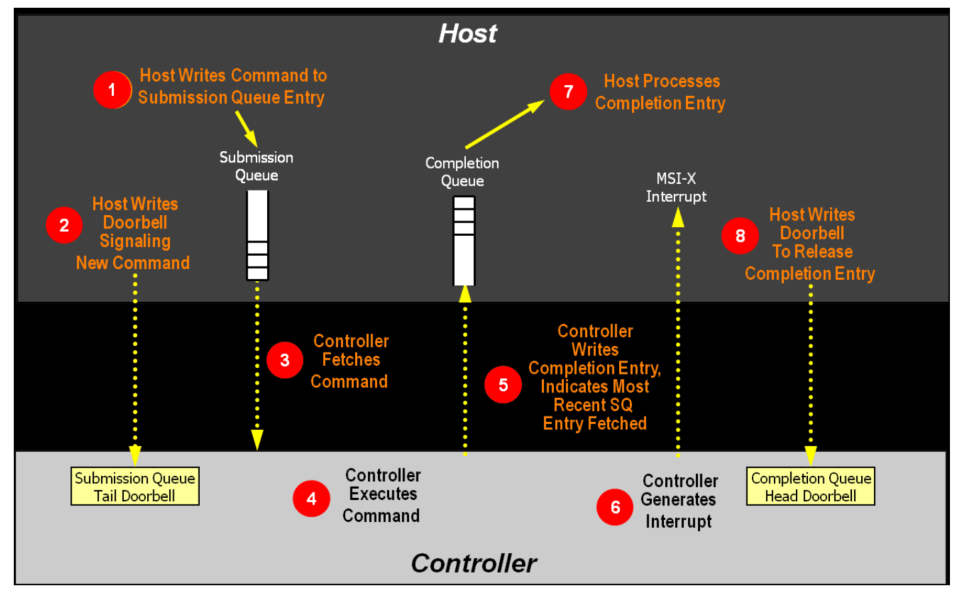
Step1: Host writes command to SQ Entry
cmd_read = SQE(2, 1)
cmd_read.cid = 0
buf = PRP(4096)
cmd_read.prp1 = buf
sq[0] = cmd_read
Step2: The host updates the SQ tail doorbell register to notify the SSD that a new command is pending.
sq.tail = 1
Step3: The DUT gets the SQE from the IOSQ.
Step4: The DUT processes the SQE.
Step5: The DUT writes a CQE to the IOCQ.
Step6: DUT sends interrupt (optional)
Steps 3-6 are all handled by the DUT.
Step7: Host processes Completion entry
cq.wait_pbit(cq.head, 1)
Step8: The host writes the CQ head doorbell to release the completion entry
cq.head = 1
The complete test script is as follows:
def test_metamode_read_command(nvme0):
    # Create an IOCQ and IOSQ
    cq = IOCQ(nvme0, 1, 10, PRP(10*16))
    sq = IOSQ(nvme0, 1, 10, PRP(10*64), cq=cq)

    # Step1: Host writes command to SQ Entry
    cmd_read = SQE(2, 1)
    cmd_read.cid = 0
    buf = PRP(4096)
    cmd_read.prp1 = buf
    sq[0] = cmd_read

    # Step2: The host updates the SQ tail doorbell register to notify the SSD that a new command is pending.
    sq.tail = 1

    # Step7: Host processes Completion entry
    cq.wait_pbit(cq.head, 1)

    # Step8: The host writes the CQ head doorbell to release the completion entry
    cq.head = 1

    # print first CQE's status field
    logging.info(cq[0].status)
The above script is a little bit more complex, but you can control every detail of the test. metamode also encapsulates a read/write interface to facilitate scripts to send common IOs in metamode. The following test script re-implements the same IO process as the example above.
def test_metamode_example(nvme0):
    # Create an IOCQ and IOSQ
    cq = IOCQ(nvme0, 1, 10, PRP(10*16))
    sq = IOSQ(nvme0, 1, 10, PRP(10*64), cq=cq)

    # Step1: Host writes command to SQ Entry
    sq.read(cid=0, nsid=1, lba=0, lba_count=1, prp1=PRP(4096))

    # Step2: The host updates the SQ tail doorbell register to notify the SSD that a new command is pending.
    sq.tail = 1

    # Step7: Host processes Completion entry
    cq.waitdone(1)

    # Step8: The host writes the CQ head doorbell to release the completion entry
    cq.head = 1

    # print first CQE's status field
    logging.info(cq[0].status)
In addition to defining the host command-processing flow, metamode can also configure any parameter in the I/O command. The following scenarios demonstrate metamode’s capabilities.
2.1 Customized PRP List
def test_prp_valid_offset_in_prplist(nvme0):
    # Create an IOCQ and IOSQ
    cq = IOCQ(nvme0, 1, 10, PRP(10*16))
    sq = IOSQ(nvme0, 1, 10, PRP(10*64), cq=cq)

    # Construct PRP1, set offset to 0x10
    buf = PRP(ptype=32, pvalue=0xffffffff)
    buf.offset = 0x10
    buf.size -= 0x10

    # Construct PRP list, and set offset to 0x20
    prp_list = PRPList()
    prp_list.offset = 0x20
    prp_list.size -= 0x20

    # Fill 8 PRP entries into the PRP list
    for i in range(8):
        prp_list[i] = PRP(ptype=32, pvalue=0xffffffff)

    # Construct a read command with the above PRP and PRP list
    cmd = SQE(2, 1)
    cmd.prp1 = buf
    cmd.prp2 = prp_list

    # Set the cdw12 of the command to 1
    cmd[12] = 1

    # Write command to SQ Entry, update SQ tail doorbell
    sq[0] = cmd
    sq.tail = 1

    # Wait for the CQ pbit to flip
    cq.wait_pbit(0, 1)

    # Update the CQ head doorbell
    cq.head = 1
2.2 Asymmetric SQ and CQ
def test_multi_sq_and_single_cq(nvme0):
    # Create 3 IOSQ, and mapping to a single IOCQ
    cq = IOCQ(nvme0, 1, 10, PRP(10*16))
    sq1 = IOSQ(nvme0, 1, 10, PRP(10*64), cq=cq)
    sq2 = IOSQ(nvme0, 2, 10, PRP(10*64), cq=cq)
    sq3 = IOSQ(nvme0, 3, 10, PRP(10*64), cq=cq)

    # Construct a write command
    cmd_write = SQE(1, 1)
    cmd_write.cid = 1
    cmd_write[12] = 1<<30

    # Set buffer of the write command
    buf2 = PRP(4096)
    buf2[10:21] = b'hello world'
    cmd_write.prp1 = buf2

    # Construct a read command
    cmd_read1 = SQE(2, 1)
    buf1 = PRP(4096)
    cmd_read1.prp1 = buf1
    cmd_read1.cid = 2

    # Construct another read command
    cmd_read2 = SQE(2, 1)
    buf3 = PRP(4096)
    cmd_read2.prp1 = buf3
    cmd_read2.cid = 3

    # Place the commands into the SQs
    sq1[0] = cmd_write
    sq2[0] = cmd_read1
    sq3[0] = cmd_read2

    # Update SQ1 Tail doorbell to 1
    sq1.tail = 1

    # Wait for the Phase Tag of the head of CQE to be 1
    cq.wait_pbit(cq.head, 1)

    # Update CQ Head doorbell to 1
    cq.head = 1

    # Update SQ2 Tail doorbell to 1, and wait for the command completion
    sq2.tail = 1
    cq.wait_pbit(cq.head, 1)

    # Update CQ Head doorbell to 2
    cq.head = 2

    # Update SQ3 Tail doorbell to 1
    sq3.tail = 1
    cq.wait_pbit(cq.head, 1)

    # update CQ Head doorbell to 3
    cq.head = 3

    # Get the completion status and CID from the first CQ entry
    logging.info(cq[0].status)
    logging.info(cq[0].cid)
2.3 Inject conflict cid error
Normally, the NVMe device driver assigns a CID to each command, so the CID is always correct and the test script has no way to inject errors. With metamode provided by PyNVMe3, scripts can specify the CID in each command. This allows us to deliberately send multiple commands with the same CID to examine the DUT’s error handling.
def test_same_cid(nvme0):
    # Create IOCQ/IOSQ with the depth of 10
    cq = IOCQ(nvme0, 1, 10, PRP(10*16))
    sq = IOSQ(nvme0, 1, 10, PRP(10*64), cq=cq)

    # Write two commands, and both cid are 1
    cmd_read1 = SQE(2, 1)
    buf1 = PRP(4096)
    cmd_read1.prp1 = buf1
    cmd_read1.cid = 1

    cmd_read2 = SQE(2, 1)
    buf2 = PRP(4096)
    cmd_read2.prp1 = buf2
    cmd_read2.cid = 1

    # fill two SQE to SQ
    sq[0] = cmd_read1
    sq[1] = cmd_read2

    # Update the SQ tail doorbell
    sq.tail = 2

    # Wait for the Phase Tag in entry 1 in CQ to be 1
    cq.wait_pbit(1, 1)

    # Update CQ Head doorbell to 1
    cq.head = 2

    # Get the command completion status and command id indicated by the second entry in CQ
    logging.info(cq[1].status)
    logging.info(cq[1].cid)
2.4 Inject invalid doorbell errors
def test_aer_doorbell_out_of_range(nvme0, buf):
    # Send an AER command
    nvme0.aer()

    # Create a pair of CQ and SQ with a queue depth of 16
    cq = IOCQ(nvme0, 4, 16, PRP(16*16))
    sq = IOSQ(nvme0, 4, 16, PRP(16*64), cq.id)

    # Update the SQ tail to 20, which exceeds the SQ depth
    with pytest.warns(UserWarning, match="AER notification is triggered: 0x10100"):
        sq.tail = 20
        time.sleep(0.1)
        nvme0.getfeatures(7).waitdone()

    # Send get logpage command to clear asynchronous events
    nvme0.getlogpage(1, buf, 512).waitdone()

    # Delete SQ and CQ
    sq.delete()
    cq.delete()
By sending I/O through metamode, scripts can directly read and write various metadata structures defined by the NVMe protocol, including IOSQ, IOCQ, SQE, CQE, doorbells, PRPs, PRPLists, and various SGLs. The script creates and accesses shared memory with the NVMe DUT directly, without any restrictions from the OS or driver.
